remote team headshotsYour team lives in twelve time zones. Your team page doesn't have to show it.
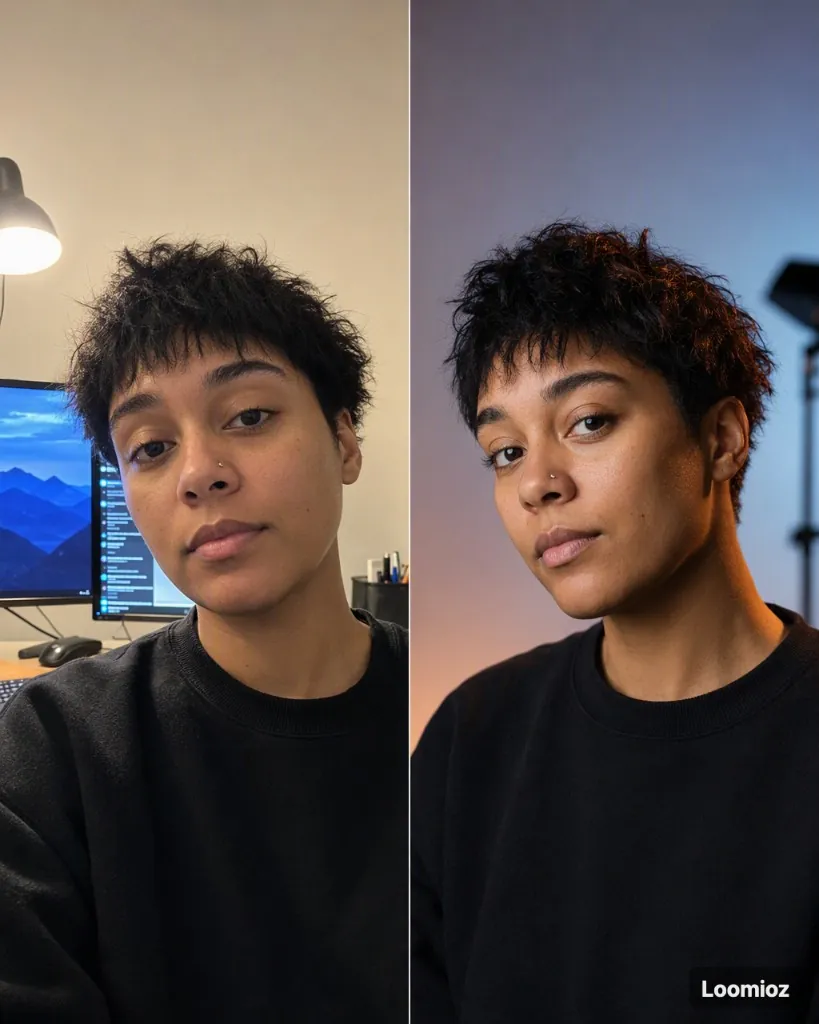
A remote team will never be in one room on photo day, so the About page ends up with a mix of selfies, cropped vacation photos and blank avatars. With Loomioz, each person uploads one clear phone photo from home, and everyone comes back in the same style.
We don't keep your original photo. Uploads are deleted from our servers within 24 hours.

Invite by link or email
Share one invite link in Slack or email, or paste the whole team's addresses. People join and upload in their own time zone.
See who is done
The admin sees who was invited, who joined and who already has a headshot, and can resend the invite to anyone who hasn't started.
New hires match on day one
Spare seats never expire, so someone joining next month gets the same look in minutes during onboarding.
PHOTO TIPS
Getting the most from your remote team headshots
Send one set of photo instructions
Ask everyone to shoot at eye level, from the chest up, facing a window, with no hats or sunglasses. Consistent inputs give consistent results.
Use the same photo in every tool
Put the headshot on Slack, email, the HR system and the website, so colleagues who have never met in person recognize each other.
Give a deadline
A short deadline, such as end of the week, and one friendly reminder get most of a remote team done.
HOW IT WORKS
- 01
Upload one photo
A clear, front-facing photo from your phone. An instant check tells you if it will work before you render.
- 02
Pick a look
Most people on this page start with Smart casual. You can change the outfit and background any time.
- 03
Download your headshot
Results arrive in minutes. Your original upload is deleted from our servers within 24 hours.
STYLES THAT FIT
Recommended looks
- Smart casual
- Blazer
- Studio gray backdrop
- Brand color backdrop
- Do people need special equipment?
- No. A phone photo taken at eye level, facing a window, is enough. Each upload is checked for blur, lighting and face angle before rendering.
- How much does it cost?
- Seats start at $29 per person and drop to $22 from the 11th seat and $15 from the 51st. Payment is one-time, with no subscription.
- What happens to our photos?
- Original uploads are deleted automatically within 24 hours, and photos are never used to train AI models.
Was this guide helpful?