professional profile picture for Slack, Teams and ZoomThe tiny photo your colleagues see a hundred times a day.
In remote and hybrid teams, your Slack, Teams or Zoom picture is how most colleagues picture you. A blurry crop from a holiday photo doesn't help. Upload one clear photo and Loomioz gives you a clean, well-lit headshot that stays recognizable even at chat-bubble size.
No sign-up · No card · Only finished photos count
We don't keep your original photo. Uploads are deleted from our servers within 24 hours.

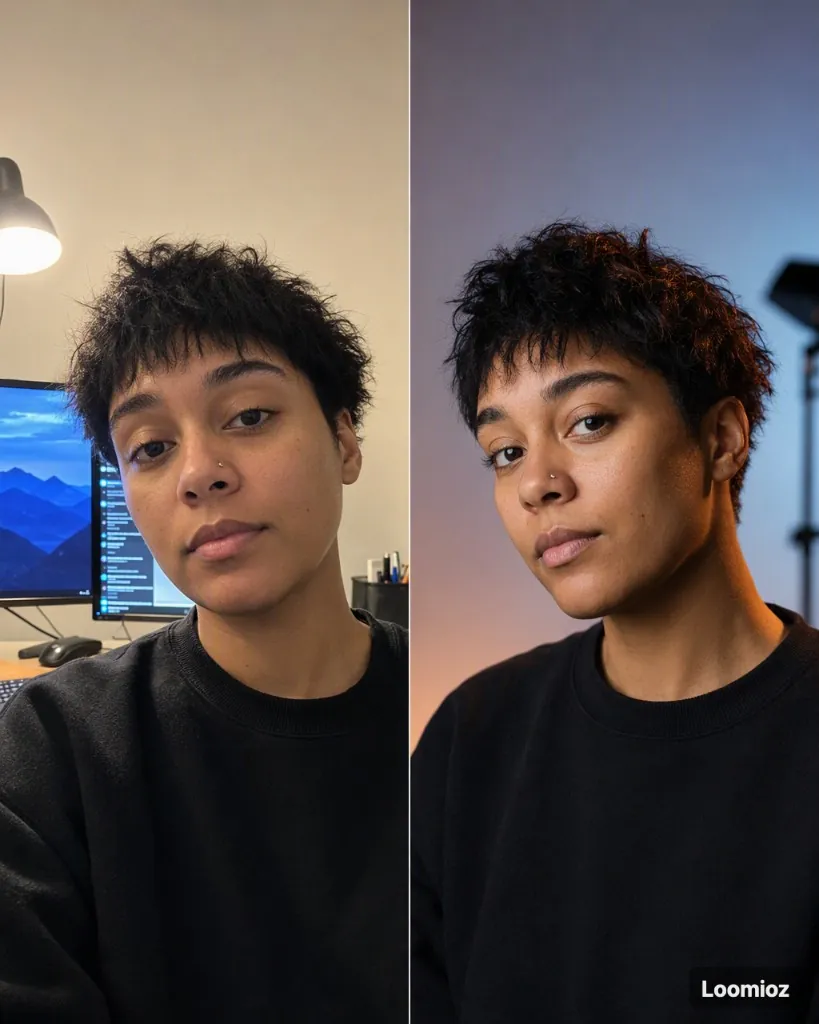
Readable at 32 pixels
Chat apps show your photo tiny. A plain backdrop and a tight head-and-shoulders crop keep your face recognizable at any size.
Consistent across tools
Use the same picture on Slack, Teams, Zoom, Google Workspace, your email signature and LinkedIn so people connect the name to the face.
Same look for the whole team
Teams can pick one outfit and backdrop so the directory looks consistent. Team pricing is per person, paid once.
PHOTO TIPS
Getting the most from your professional profile picture for Slack, Teams and Zoom
Crop tighter than you think
In chat apps your photo is tiny. Frame from the top of the shoulders up so your face fills most of the circle.
Use the same photo everywhere
Slack, Teams, Zoom, Google, email signature and LinkedIn. One photo makes you easier to recognize across tools.
Set a Zoom profile picture too
Zoom shows your profile picture whenever your camera is off, so add it there as well.
HOW IT WORKS
- 01
Upload one photo
A clear, front-facing photo from your phone. An instant check tells you if it will work before you render.
- 02
Pick a look
Most people on this page start with Smart casual. You can change the outfit and background any time.
- 03
Download your headshot
Results arrive in minutes. Your original upload is deleted from our servers within 24 hours.
STYLES THAT FIT
Recommended looks
- Smart casual
- Tech casual
- Business casual
- Studio gray backdrop
- What size should a Slack or Teams photo be?
- Slack recommends 512 × 512 pixels; most work tools accept any square photo and crop it to a circle. Our free resizer exports the right size.
- Should my work photo be formal?
- Match what your team wears on a normal day. Smart or tech casual suits most offices; choose a suit if you face clients in finance or law.
- Can my company roll this out to everyone?
- Yes. A team plan gives everyone one invite link, and new hires can make a matching photo whenever they join.
- What happens to my photo?
- Original uploads are deleted automatically within 24 hours.
Was this guide helpful?